

Essential guide to dabl library

A data science model development pipeline involves various components including data collection, data processing, Exploratory data analysis, modeling, and deployment. Before training a machine learning or deep learning model, it’s essential to clean or process the dataset and fit it for training. Processes like handling missing records, removing redundant features, and feature analysis are part of the data processing component.
Often, these processes are repetitive and involve most of the model development work time. Various open-sourced Auto-ML libraries automate the entire pipeline in few lines of Python code, but most of them behave as a black-box and do not give intuition about how they processed the dataset.
To overcome this problem, we have an open-sourced Python library called dabl — data analysis baseline library, that can automate most of the parts of the machine learning model development pipeline. This article will cover the hands-on implementation of the package dabl including data preprocessing, feature visualization, and analysis, followed by modeling.
dabl:
dabl is a data analysis baseline library that makes supervised machine learning modeling easier and accessible for beginners or folks with no knowledge of data science. dabl is inspired by the Scikit-learn library and it tries to democratize machine learning modeling by reducing the boilerplate task and automating the components.
dabl library includes various features that make it easier to process, analyze and model the data in a few lines of Python code.
Getting Started:
dabl can be installed from PyPI using
pip install dabl
We will be using the Titanic dataset downloaded from Kaggle for implementation of the library.
(1.) Data Pre-processing:
dabl automates the data preprocessing pipeline in a few lines of Python code. The pre-processing steps performed by dabl include identifying missing values, removing the redundant features, and understanding the features’ datatypes to further perform feature engineering.
The list of detected feature types by dabl includes:
The list of detected feature types by dabl includes:
1. continuous
2. categorical
3. date
4. Dirty_float
5. Low_card_int
6. free_string
7. Useless
All the dataset features are automatically categorized into the above-mentioned datatypes by dabl using a single line of Python code.
df_clean = dabl.clean(df, verbose=1)

The raw Titanic dataset has 12 features, and they are automatically categorized into the above-mentioned datatypes by dabl for further feature engineering. dabl also provides capabilities to change the data type of any feature based on requirements.
db_clean = dabl.clean(db, type_hints={"Cabin": "categorical"})
One can have a look at the assigned datatype for each feature using detect_types() function.

(2.) Exploratory Data Analysis:
EDA is an essential component of the data science model development life cycle. Seaborn, Matplotlib, etc are popular libraries to perform various analyses to get a better understanding of the dataset. dabl makes the EDA very simple and saves worktime.
dabl.plot(df_clean, target_col="Survived")
plot() function in dabl can feature visualization by plotting various plots including:
- Bar plot for target distribution
- Scatter Pair plots
- Linear Discriminant Analysis
dabl automatically performs PCA on the dataset and also shows the discriminant PCA graph for all the features in the dataset. It also displays the variance preserved by applying PCA.
(3.) Modeling:
dabl speeds up the modeling workflow by training various baseline machine learning algorithms on the training data and returns with the best-performing model. dabl makes simple assumptions and generates metrics for baseline models.
Modeling can be performed in 1 line of code using SimpleClassifier() function in dabl.
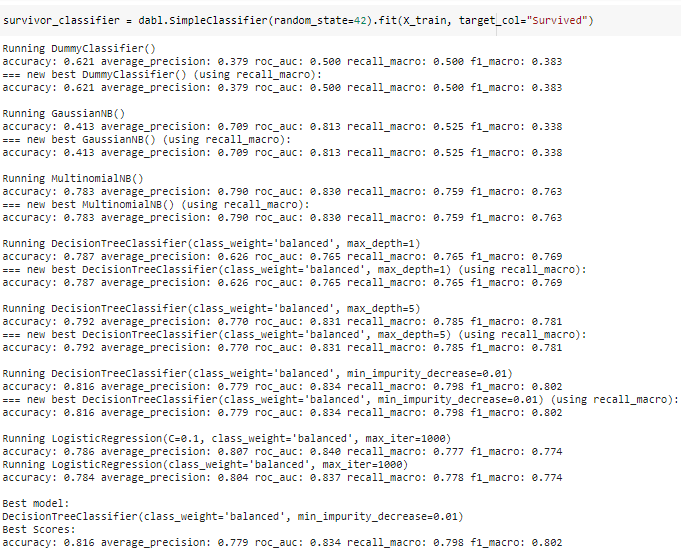
dabl returns with the best model (Decision Tree Classifier) in almost no time. dabl is a recently developed library and provides basic methods for model training.
Conclusion:
Dabl is a handy tool that makes supervised machine learning more accessible and fast. It simplifies data cleaning, feature visualization, and developing baseline models in a few lines of Python code. dabl is a recently developed library and needs a lot of improvement, and it’s not recommended for production use.
 DataTask